
ASCII Art from Photos: Preserve Light and Shadow
Keep the subject readable without flattening its shadows
Compare a rose photo at neutral and higher contrast. Learn how cropping, tonal detail and output width affect photo-to-ASCII results.

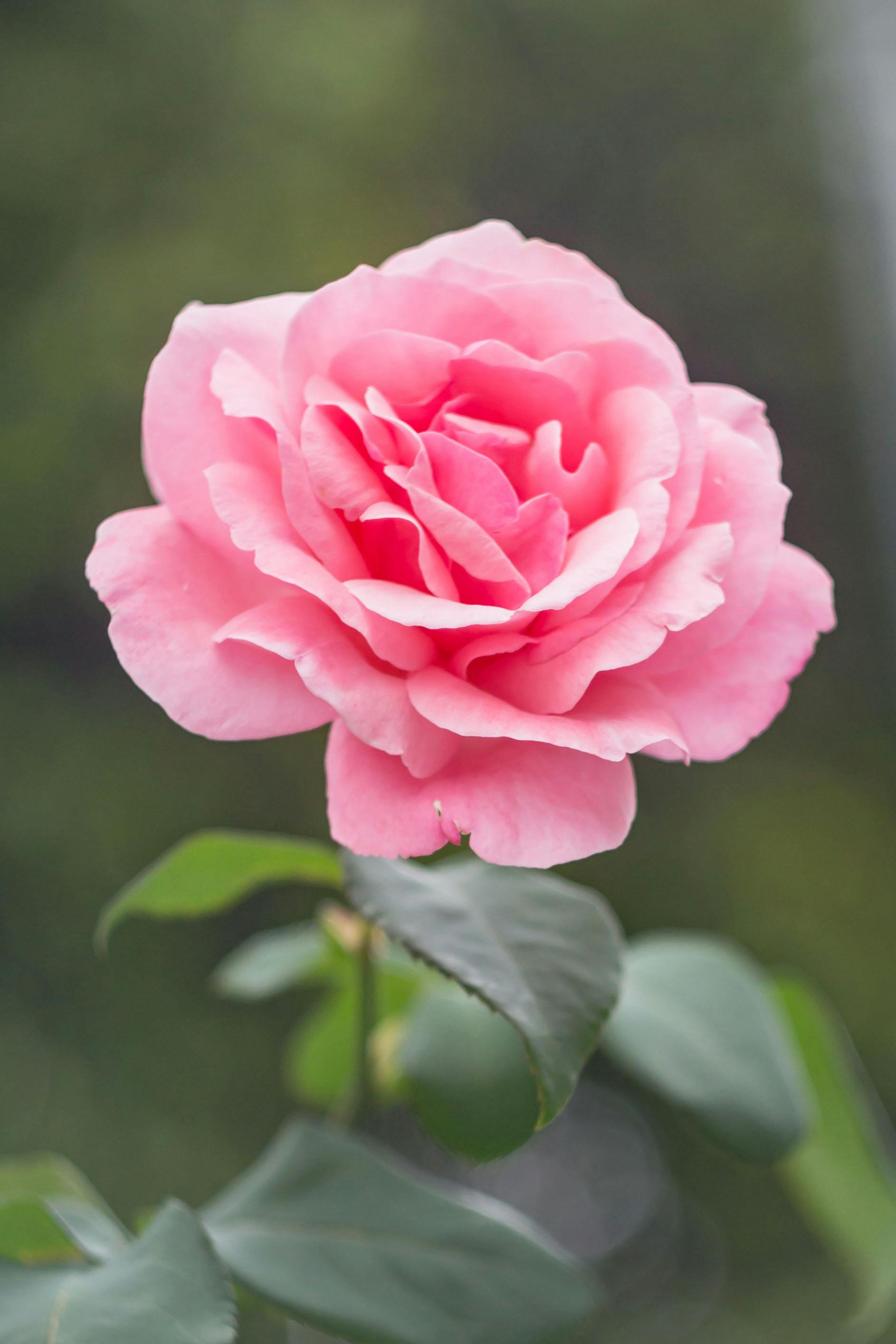
Worked example: Rose photo
This guide uses the image-to-ASCII editor. The examples below are generated from the same source; this page is not a separate converter.
- Choose a crop that keeps the flower large in the frame. For portraits, make the face the main subject before opening the editor.
- Open the rose sample. In Options, select Standard ASCII Art, Output Width 80, Brightness 100% and None (Direct Mapping) dithering.
- Compare Contrast at 100% and 140% with the same character ramp. Select Generate ASCII Art after each change and check whether adjacent petals remain separate in Result.
- If shadows merge, lower contrast rather than adding more effects. Fine detail cannot survive a very small output grid.
- Save as TXT for editable characters or PNG when the receiving app cannot preserve monospace spacing.
######****************++++++++++++++++*********************************++++=====
#####****************+++++++++++++++++*********************************++++=====
*********************++++++++++++++++***********************************+++=====
**********************+++++++++++++++***********************************+++=====
**********************+++++++++++++++***********************************++++====
************************+++++++++++*************************************++++====
****************************+++++****************************************++++===
*************************+++*********************************************+++++==
*************************+++++********************************************++++==
**************************++++*************##******************************++++=
####**********************+++*++***********++*####**************************+++=
#####*********************++++++*+****+=--:..:=++**##***********************+++=
####***********+++++++*++++++++++++-::..........::--+*#*********************++++
####*********++++*++********++=-:::...::::::.........:=**********************+++
##************+*++++++==-----:...::::::::::::::::::::..-*#*******************+++
#**************+:..:.......:::::::::::::------::::::::..:=+******************+++
***************:.::::::..:::::::::::::::---------:::::::...-*#****************++
*************+::::::.:::::::::---::::-::---::::--::::----::.:*####*************+
*************-.::::.....:::::-==-------=+++===-----------:::.-****###***********
************+:::::::.....::::::--.-====+++**+++====--=-::....:..:::=*######*****
************+::::::::::::::::=+-:---=**=-=++++++=-====-::...::...:::=#######****
************+:::::::---=-::::-+*+-++----=------+:.=+===-::...:....::.=######****
************+::::::::--=---:::-=++==+-==---==++=-:=+--=-::..::::::...:#######***
*************-:::::.::--=-----:--++---=+==---+*==----==-::.:-::-::::.:*######***
*************+-::::::::------=----=++-:-==----==-=-==++-:...-:-=--:::.-#######**
*********=-:::::---:::::-----=++=-====-:--------=--++=:....:::--::::::*#######**
#****#*#=...:::-==---...:--=--=******===----==++=---:....:.:--:..:::::+*#######*
#######+:..:::---====--...:---=+*#***=-++=--:-+===-.....::-=-..:::::::.:-*#####*
#######*:.:::------====--::..:---=++**--**++=--=-:....:====::..::-::::::.:+####*
########*-:::::-----===-====-::......:::-=++==-:...--====-::....:--:----::=#####
#########*:::::::---::::--==++=::--::::..::::-=+*+====--:::::::----------:=#####
#########*::::::::::--::::-===+*+===++*****++++*+====-:::..-====------::-*######
##########+::::::::-=====--:-===+*++++*##******+===-:::::-======-----::-+#######
###########*-:::::::----===:::---==++===++*##*++==-:-+++++=====-----::=*########
#############+-:::::-------=-::::---=:::---==+++==-=**++====--------:-+#########
####***###**###+--:::::----==+------==-:::::::::---==----:::--::::::-*##########
***************##*++++++****#=-==----=++++=====---::::..::::::::::-+############
*****************##########**--==+++===+*****++++++===--+#*++++++**#*****#######
**********************#####*#=:--==+++++++===============########************###
*******************########*#=:------------------======--*###******************#
***************##****########=:::----------:------------=###********************
#************##*+++++++++++***=-:::---=+**-::::::::::--=*#**********************
#####*********++++++++===++==+++=----=+++==------=++**######********************
######***#**++=+++++++*********++=----:::--======++**########*******************
#########*++++++++++*########***+==--------=========++*########*****************
########*+*###*##########***+=--=+===-============+++++*####**##****************
########**###########**+=====+==++=+++=--=====++++++++++++=====++***************
###################*+=----==++++*+===+++=======++++++++=-------===++************
###################*+===+*****++**+++=======-==++++++++=-----=======+++*********
############################**++**+++====-=++=-=+++****=------========+++*******
***###########*****#######**++++*+======+===+++==+****+==-----=========+++******
*******##**************##**+++++*+--==++++++++**++***#*+===============++++*****
**********************###*++++++*+==++++*+++********####*+==============++++**#*
*********************####**++++***+**#*********#****######*++===+====+==++++***#
*******************########*****################****#########*****+++++++++++**#
*********************####*+*****################*********########******+++++++**
**********************#*+++*********##*######*************############*+++++++**
+++++++****************+++*******************++++**********###########*++=+++++*
+++++==+************++=+************+++++++++++++***********##########**++=+++++
+++++====+****+=+*+===+++++++++*++++++++++====++**+**********##########**+++++++
++++++=---=*+==+++=-====++++++++++++++++**+++===++********##############**++++++
+++++++=---====++++=-===++++++++++++++++*******+++++****##################**+++=
++++++===--====++++*++===++++++++++**++++++*******+***##################*****++=
====------=====+++++****++++++++++++***********************###***###*********++=
====--=========++++++********+++++++++***************************************+++
===========++++======***************+++*************************************++**
Edit contrast 100% settings

%%%%%########*************+++++++++++*****######*#*************##*******+++=====
%##############********++++++++++++++*****####################*######***+++=====
################*******+++++++++++++******##########################*****++===--
##################******+++++++++++*******##########################****+++===--
###################******+++++++++********###########################****+++===-
###################***********++**********###########################*****++===-
###################********************##############################*****+++==-
###################*******************################################*****+++==
#################********************###################################***+++==
################*************************################################***+++=
################**********************#####***############################***++=
%%%##########*************************+--:.  .=**##%######################****+=
%%######************************+*+-..      .   ..:-+#####################****++
%%#####**********************+=:...  ..........  .  .:=####################****+
#######**********++*++==-::::.  ....::::::::.........  :###################****+
#####**********+.  .       .........::::------::::..... .-*#################***+
#####**********: ....... .::....::...:::--::----:::......  :*###############****
#####********+....:. .....::::::::::::::--:::::-:::::--:::. .#%##############***
####*********: ...:    ...::::==-------=**++===---::----:::: -#**##%#########***
######*###*#*.....:.    ..:..::--.-++=+*******++++==-=-:.. .......:=#%########**
############+.....:::.::..:.:+*-:::-+**+-=++****+-==+=-:..  ...  ...-%%%%%#####*
############+.::::::--==-.:..:+*+-++--=-=-:----+: =*+==-:.   ..   .. =%#%%%%###*
############*.:.:::::--=-:::..:=**=++:=+=--=+**=::+*--=-:.. ...:..   .#%%%%%####
#############-.:::...::-=-::::::=**-::=*+=---+*+=----===:. .:::-::.. .*%%%%%%###
############*+:::::...::-----=---:=*+::-===---+===-==+*-.  .-.:=-::.. -%%%%%%###
#########=:....:-:::....:----=**+-====-:::-==--==--*+=:    .::--:::...*%#%%%%%##
#######%=  ...:--=--:....:-=--=******=+=-::-=+++=---.    ..:-:.  .....+#%%%%%%##
######%*.....::--====-:   .:-==+*****=-*+=-::=++==-.    ::-=:. ..:......-*%%%%##
%%%%%%%*. .::::----====-::.. :---=+***-=***+==-=-:   ..=++=:.  .:::.......+%%%%#
%%%%%%%%#-:::::::---===--===-:...    .:.:++++=-..  :-=++=-:.    .-:::::::.-%%%%#
%%%%%%%%%*.::::::::-::::--==+*=::--:.... ...:-=+**++===-::....:------:::::=%%%%%
%%%%%%%%%#..::.....::::...:===+*+-==+********+***+===-:.. .-====----:::.:*#%%%%%
%%%%%%%%%%*........:=====-:.:===**++++*#********+==-:...::======---:::::*%%%%%%%
%%%%%%%%%%%*:.....:::----==:.::---=++===++##**++==-::+*+++=====---::::-#%#%%%%%%
###%##%%%%#%%+:...:::::::----:.::::--::::--=+++++=-=**++===-------:::-*%##%%%%%%
#############%#+-::::::::---=+-::::-==-:......::::-==---::::::::::::-*%###%%%%%%
###############%##*+++****##%=:==-::-=++++====---::...  .....::...-*#%##%%%%%%%%
##################%%%%%%%####-:==+++===+*#*****+++++==-:+##*+++++*#########%%%%%
#############################-:---=+++++++===============%%%%%%################%
####################%%#%%####-:::------:------------===-:#%#####################
#######################%%%%#%=.::::::::--::::::::::----:=%######################
################*+++++++++****=::::::--+*#-..::.....::-=#############*##########
%%############++++++++===++==+++--::-=+++==---:::-+**##%############****########
%%%%#######*++=+++++++*#######**+=---::..:--=====+**#%%%%%############**########
%%%%%#####*++++++++*#%%%%%%%#*#*+==---------========++#%%%%%####################
%%%%#####*########%%%%%%%##*+=:-=+==---===--======+++++#%%##############*#######
%%%%%#####%#%%%%%%%%%#*+===-=+=-*+=+++=---====++++++++++++=====++*##############
%%%%%%%%####%##%%%%#*=----==+++*#*===+++=--====++++++++=:::::----=+*############
%%%%%%%%########%%%*+===+*####*+#*+++=-=====--=+++***++=::------====++***#######
##%%%%%%#########%%%%###%%%%#*++#*+++===--=++=-=+****#*-:::----=======+++*######
####%#################%%%%#**+++#*=-====+===+++==**###+--------=======++++*#####
########################%#*++++*#+:-==+++++++******####+==--==--=======+****####
##########################*++++*#*==+*********##****%@%%#+==============+***####
##########################******##**################%%%%%%#*+===+====+==+++**###
########################%%####*#%%##%%%%%######%########%%%%%#*****+++++++++**##
#########################******#%%%%%%%%%%%%%%%#*#########%%%%%%#####***++++***#
###***##################*++******#########%%###*****#######%%%%%%%%%%##*+++++**#
+++++++*##############*++***##*******######**********#######%%%%%%%%%#*++=++++**
+++++==+*######*####*+=+**##*************++++*************###%%%%%%%%%#*++=+++++
+++++====+##**+=+*+===++***************+++=--=++*******#**###%%%%%%%%%%#**++++++
*****+=---=*+==+++=--===++++***************++===+******######%%##%%%%##%##*+++++
**+***+=---====+++*=--==++++++++++**+***********+++***###%##%%%%#%%%%%%%%##*+++=
*+++++===---===++++**+===+++++***********************#######%%%##%%%%#######*++=
===--:::---====++++**##*+++++++++*******#************#######################*++=
=------========++++++######****+++++****##**********########################*+++
====--=====++++======#####*#######*********###############################******
Edit contrast 140% settings

All comparisons use the @%#*+=-:. ramp (including its final space). Settings not mentioned stay neutral. Previews use the same conversion algorithm with build-time sampling; browser pixels may differ slightly.

The link selects the image only. Apply the listed mode and settings in the editor.
In Options, choose a mode and width, then select Generate ASCII Art. Open Advanced image settings for adjustments, character sets and mode-specific controls. In Result, use Copy, Download TXT or Download PNG. Generate again after changing settings to update the full result. ASCII Preview is reduced: up to 60 columns for character modes, or a fixed 32-pixel sampling width for Emoji Mosaic. Generate the full result to apply the selected Output Width or Sampling Width.
These are manual settings for the shared image editor, not a portrait preset or an automatic photo-enhancement tool.
At 100% contrast, the pink flower maps to light punctuation against a denser background. At 140%, some upper petal highlights become spaces and the surrounding foliage uses darker symbols.
Compare the curled center with the bright upper petals. The higher-contrast specimen contains 110 blank cells; the neutral specimen contains none.
The stronger difference between flower and background also removes some highlight texture. Neither specimen preserves the original pink and green colors.
Keep the source, 80-column width and character ramp fixed while comparing 100% and 140% contrast. If dark regions merge or pale petals disappear, move contrast back toward neutral and generate again.
For your own photo, crop before loading and repeat the same one-setting comparison. See the upload and export tutorial for general instructions, or the picture width comparison when the result needs to fit a smaller space.
What makes a good photo for ASCII art conversion?
Choose a photo with a subject you can crop around. Check its light and dark features at the intended output width; small details and color-only differences can disappear.
How can I improve the quality of ASCII art from my photos?
Crop to the features you want to keep. The default is 100 columns; 60-80 columns is a narrower starting point for a small text area, not an increase in detail. Compare a wider result if space allows, then compare character sets and contrast at the same width. Check that highlights and shadows remain distinct.
Can I create ASCII art from smartphone photos?
Yes. Use a still photo in a supported format within the input limits. Camera type does not determine which features survive the character grid.
What's the difference between ASCII art from photos vs. other images?
Photos often have more gradual tonal changes than logos or silhouettes. The same image converter handles both; this guide compares contrast settings so you can judge which details survive.
Picture width guide
Compare picture widths for a terminal or README.
Dithering guide
Compare no dithering with Ordered on the same beach image.
Photo ASCII Gallery
Browse examples of photos converted to ASCII art for inspiration.
Photo to ASCII Tutorial
Complete guide with tips and techniques for photo ASCII art creation.