
ASCII Pictures for Terminals: Choose a Width
Fit a recognizable picture into a text-only space
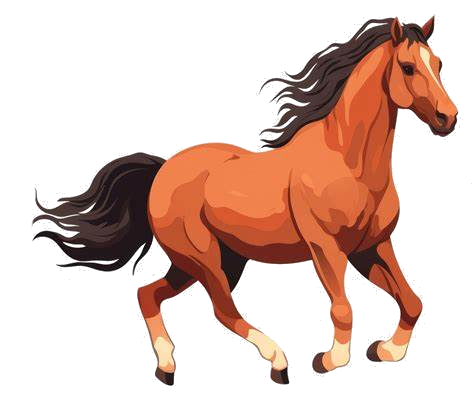
Compare a shaded horse illustration at 40 and 80 columns. Choose a width that fits your terminal or README, then check the legs, mane and tail.

Worked example: Horse illustration
This guide uses the image-to-ASCII editor. The examples below are generated from the same source; this page is not a separate converter.
- Open the horse sample. In Options, use Standard ASCII Art with neutral brightness and contrast.
- Start at 40 columns with the @%#*+=-:. ramp and a trailing space. Look for the legs and tail.
- Set Output Width to 80 and select Generate ASCII Art again. Compare the full Result, not the reduced ASCII Preview. More columns need a wider text area.
- Paste inside a fenced code block or terminal with wrapping disabled. Keep leading spaces and blank rows.
                                ..  .
                             .=***+*-
                          :=*##++*+-:
                      ..:=*##*==*+*=-.
                       :+*##*==+*+++=:
                       :+***+=++*=.=*+:
                ....  :+*=-=+++++.  :-.
         -=++-:----=---=----=++++.
       :*%%%%=-===------==-===+++.
   ..=+*%%%%*-==+===---=+======+=-
   :=+*##%#%#=++=*++====+==+++**+-
   .-+*%#%%#*=++++##******+=*###*.
     :=++*+:  *#*+*%*:-==-=+==##*-
           .-+#*-+**.      == .-++:
           :+=.  .*+       .=:   -+-
            ::    .==.      =-   :+.
            ...      ..   .:.. =:..
             =-       .=: --.  ..
             .:        :.
Edit 40 columns settings
                                                              ...::     ..
                                                            .==+*#*++*+=*:
                                                        . .=*#######*###=
                                                     ..-+*###%#+=+*===--:
                                                   .=**######+=-=++++==.:=:
                                                  :+*######*=-==+*++%#+=:=-
                                            .:.:-+*++*###%*--=++**==++===-:
                                            . .-=*#**###%#=-=+++**===+====-.
                                              .:-==+#####+==+++++**==+***+--:
                                               -+**####*++=++++++*#:.:+#***==.
                                             .:=+*#*+=+++==++++++*+    :+*##+
                                            ::-*#*=---=++=++++++++-      -==.
                               .::-----::.  :=**+-----==+=++++++++.
                  .:-=+**+=-.----------==----------------=++++++++.
                .=*#%%%%%%#=------==------------==--------=+=+++++.
               :*#%%%%%%%%=-=--=====------------===-----====++++++.
             .-*#%%%%%%%%+-=-======------------=+====-========++*+-
      :  .-+*####%%%%%%%%=--======+=-=---------=++============+*+==.
      :==***#*+*#%%%%#%%%+-======+*+============++==++==++==++++===:
     .:::-++*###%%%%##%%%*==+++==+**+++++++++++++*===+++++++****=+*.
      :==+-:=#######%%%%%#++++++===*#***++++++++++*===++*######*##:
      ...=#***#%%%%%%%%*#=:*+++++==+*%###*********#*++==+#######*+.
          .+#%%%%##%%%=-=  .+#***++++#%%%###########***===*%%%%%++-
          .:-==++++*+:::    :#####*++#%%%= .:::-:::..=*+==:=#%###*+:
                 ..   .   .-#%%%###**+#%+            :+++=. .+*+**++.
                       :=+*##%#+: =##**+              :++=.    :=**++:
                       =**#*=:.    =***.               :==:      .=*++-
                       :***.        +*#*.              .---.       =*++.
                        -=-:        :+**+:             .++=:       -##-
                        .---.         :===:.            -+=:      .==-
                         :..:.          ......          :--.  .-:.:-:
                         .:...             .....     :::.... .**:....
                          :..:               ::.:   .*=::..   :-....
                          =**-               :**=    :-.
                           :+.                :=-
Edit 80 columns settings
All comparisons use the @%#*+=-:. ramp (including its final space). Settings not mentioned stay neutral. Previews use the same conversion algorithm with build-time sampling; browser pixels may differ slightly.

The link selects the image only. Apply the listed mode and settings in the editor.
In Options, choose a mode and width, then select Generate ASCII Art. Open Advanced image settings for adjustments, character sets and mode-specific controls. In Result, use Copy, Download TXT or Download PNG. Generate again after changing settings to update the full result. ASCII Preview is reduced: up to 60 columns for character modes, or a fixed 32-pixel sampling width for Emoji Mosaic. Generate the full result to apply the selected Output Width or Sampling Width.
Fewer columns fit a narrower text area but merge small source details. Compare the horse above before choosing a width for your own destination.
If the legs or outline disappear, try more columns or crop closer to the subject before uploading. If the picture looks broken only after pasting, check line wrapping and preformatted spacing first.
The 40-column horse fits a narrower text area; the 80-column version uses more cells. Compare the legs, mane and tail before choosing. Pale details can disappear at either width.
Keep the same font and line spacing when comparing. If lines wrap after pasting, use a preformatted code block or a narrower width. A wider grid is not a fix for a proportional font.
For file selection and saving, follow the upload and export tutorial. This page's worked procedure is the 40/80-column comparison above.
How do I convert a picture to ASCII art?
Open the image editor from this guide and choose your picture. In Options, choose a mode and width, then select Generate ASCII Art. Open Advanced image settings for adjustments, character sets and mode-specific controls. In Result, use Copy, Download TXT or Download PNG. Generate again after changing settings to update the full result.
What file formats does the ASCII picture generator support?
Use still PNG, JPG, single-frame GIF, still WebP or uncompressed BMP. Animated PNG/WebP, multi-frame GIF and user SVG, AVIF and other unsupported formats are rejected before image decoding; export one frame to a still PNG first. Bundled Twemoji SVG artwork is a trusted site-asset exception. Choose one image up to 10 MiB (10,485,760 bytes) and 24 million decoded pixels. Conversion allows at most 40,000 sampling cells and 1,000 sampling rows. Reduce width or resize/crop the input if a limit is exceeded. Selected files are converted in your browser, not uploaded to an application conversion server. Image URLs still make requests to their source hosts. The site uses Google Analytics; third-party network ads are currently disabled. Browser-local conversion does not mean zero data collection. Read about data handling, browser storage and the vendor-free editors on the About page before using confidential content.
Is the ASCII picture generator free to use?
The image editor is free to use without an account. It processes one image at a time, subject to file-size, decoded-pixel and output limits.
Can I use ASCII pictures generated from this tool commercially?
Conversion does not grant rights to the source material. Use images and text you have permission to reproduce, check applicable font or artwork licenses, and respect trademarks. Commercial use may require additional permission.
Conversion preview
Compare a reduced preview while adjusting settings. Processing time depends on mode, width and device.
📱 Mobile Friendly
The layout adapts to smaller screens. Wide results scroll; your browser needs JavaScript and canvas support.
🎨 Customizable
Multiple character sets, adjustable width, brightness, contrast, and color effects.
Browser-local conversion
Local-file conversion runs in your browser. The site uses Google Analytics; third-party network ads are currently disabled. Read about data handling.
💾 Multiple Export Options
Copy to clipboard, download as text file, or save as image with custom fonts.
🆓 Completely Free
No registration required. File-size, decoded-pixel and output limits apply.
Dithering guide
Compare no dithering with Ordered on the same beach image.
Photo contrast guide
Compare photo contrast settings and preserve light and shadow.
ASCII Picture Examples
Browse gallery of ASCII art created from various types of pictures and photos.
ASCII Picture Tutorial
Complete guide to creating the best ASCII pictures from your photos.