
Sea Turtle Silhouette Clipart ASCII Art
A black sea turtle silhouette swimming in profile, with a raised head, broad shell and outstretched flippers on a transparent background
The shell and raised head read as one shape at 40 columns. At 80, the front flipper and head separate more clearly; the solid silhouette does not show shell scales.
Built Standard preview: 100 columns by 42 rows. Each result card lists its recipe. Select the text below to copy it without JavaScript.
View the conversion source
Source and reuse rights: documented; owner review pending
The conversion-source link provides the file used to make this example, not permission to redistribute it.
View bundled original file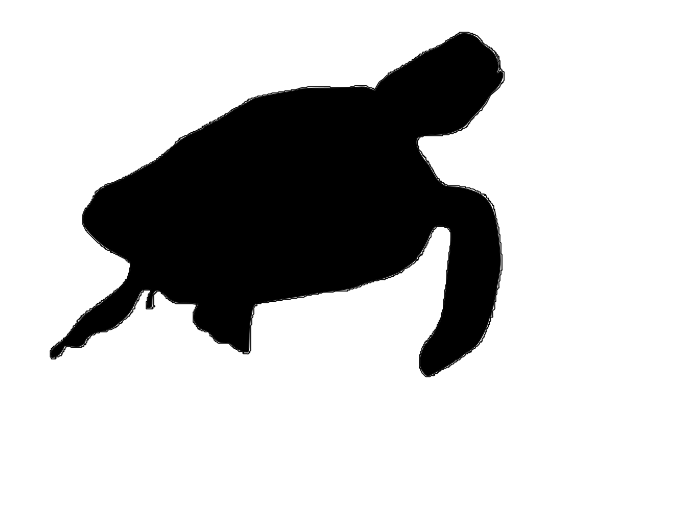
- Original source
- Openclipart item sea turttle silhouette (item 85027). Evidence link Evidence: Downloaded on October 29, 2026 from https://openclipart.org/download/85027; original source SHA-256 f56a939d5dd2fccf32f7d3491b3675a768d2e511a0f0fb28bf911209d30de9c3. The exact item title misspells "turtle" as "turttle"; its description and visible artwork identify a sea turtle..
- File creator
- dragonassbabe, credited on the exact Openclipart item page. Evidence link Evidence: The item page names dragonassbabe as the artist and describes the work as: "sea turtle silhouette".
- License or terms
- CC0 1.0 Public Domain Dedication under Openclipart's artist release terms. Evidence link Evidence: Openclipart states that artists release their shared works under CC0 1.0: https://openclipart.org/share. The exact item and artist are linked above; attribution is retained voluntarily..
- Preparation
- The original SVG is bundled unchanged. Sharp rasterizes it at 96 dpi and trims transparent padding before the PNG is used for browser editing. Evidence: Bundled SVG SHA-256 f56a939d5dd2fccf32f7d3491b3675a768d2e511a0f0fb28bf911209d30de9c3; derived PNG SHA-256 4b94857dd018827a531ecea488a89cf03a75687d0963e455f12d1ef081818f31. Sharp 0.35.5 rasterizes the bundled SVG at 96 dpi; scripts/build-example-previews.cjs samples it with sRGB/Lanczos3 and the production Standard converter. Transparent pixels are composited onto white..
Owner review: PENDING. Exact Openclipart item, creator attribution, CC0 terms and file hashes are documented for owner review. This does not clear unrelated works by the same artist.
Standard ASCII
Standard ASCII Art: 100 columns; rows = max(1, round(columns × source height / source width × 0.55)).
Character ramp: @%#*+=-:. (including a final space).
Brightness 100%, contrast 100%, saturation 100%, hue 0, sepia 0%, inversion off. Dithering: none.
Open this recipe in the editor to keep this source, mode and settings. Browser resampling and fonts can differ from the built preview. Copy/TXT retain text; PNG uses black text on white at 12 px monospace, at least 1.2 line spacing and 20 px padding, independent of screen theme.

                                                                                       .-*%%#+:
                                                                                    .-*%@@@@@@%+.
                                                                                 -+#%@@@@@@@@@@@@*.
                                                                              :+%@@@@@@@@@@@@@@@@@#
                                                                           :+#@@@@@@@@@@@@@@@@@@@@%-
                                                                         =%@@@@@@@@@@@@@@@@@@@@@@@@#
                                                      .:::----::::-===::%@@@@@@@@@@@@@@@@@@@@@@@@@#:
                                             .:-=+*##%@@@@@@@@@@@@@@@@@@@@@@@@@@@@@@@@@@@@@@@@@@%=.
                                          -*#@@@@@@@@@@@@@@@@@@@@@@@@@@@@@@@@@@@@@@@@@@@@@@@@@@%:
                                       -*%@@@@@@@@@@@@@@@@@@@@@@@@@@@@@@@@@@@@@@@@@@@@@@@@@@@@*.
                                   .-+%@@@@@@@@@@@@@@@@@@@@@@@@@@@@@@@@@@@@@@@@@@@@@@@@@@@@@%-
                                .=*%@@@@@@@@@@@@@@@@@@@@@@@@@@@@@@@@@@@@@@@@@@@@@@@@@@@@@@%+.
                            .:+#@@@@@@@@@@@@@@@@@@@@@@@@@@@@@@@@@@@@@@@@@@@@@@@@@%#****+=:.
                           =%@@@@@@@@@@@@@@@@@@@@@@@@@@@@@@@@@@@@@@@@@@@@@@@@@@@%.
                        .=#@@@@@@@@@@@@@@@@@@@@@@@@@@@@@@@@@@@@@@@@@@@@@@@@@@@@@@=
                      :+%@@@@@@@@@@@@@@@@@@@@@@@@@@@@@@@@@@@@@@@@@@@@@@@@@@@@@@@@@+.
                   :+#@@@@@@@@@@@@@@@@@@@@@@@@@@@@@@@@@@@@@@@@@@@@@@@@@@@@@@@@@@@@@#.
               .-*%@@@@@@@@@@@@@@@@@@@@@@@@@@@@@@@@@@@@@@@@@@@@@@@@@@@@@@@@@@@@@@@@@#.
           .=*#@@@@@@@@@@@@@@@@@@@@@@@@@@@@@@@@@@@@@@@@@@@@@@@@@@@@@@@@@@@@@@@@@@@@@@%+--::.
         .*@@@@@@@@@@@@@@@@@@@@@@@@@@@@@@@@@@@@@@@@@@@@@@@@@@@@@@@@@@@@@@@@@@@@@@@@@@@@@@@@%#*=:
        .#@@@@@@@@@@@@@@@@@@@@@@@@@@@@@@@@@@@@@@@@@@@@@@@@@@@@@@@@@@@@@@@@@@@@@@@@@@@@@@@@@@@@@@+
       :%@@@@@@@@@@@@@@@@@@@@@@@@@@@@@@@@@@@@@@@@@@@@@@@@@@@@@@@@@@@@@@@@@@@@@@@@@@@@@@@@@@@@@@@@+
       #@@@@@@@@@@@@@@@@@@@@@@@@@@@@@@@@@@@@@@@@@@@@@@@@@@@@@@@@@@@@@@@@@@@@@@@@@@@@@@@@@@@@@@@@@%.
       *@@@@@@@@@@@@@@@@@@@@@@@@@@@@@@@@@@@@@@@@@@@@@@@@@@@@@@@@@@@@@@@@@@@@@@@@@@@@%*#%@@@@@@@@@@=
        =%@@@@@@@@@@@@@@@@@@@@@@@@@@@@@@@@@@@@@@@@@@@@@@@@@@@@@@@@@@@@@@@@@@@@@@@@@%:  :@@@@@@@@@@*
         .+%@@@@@@@@@@@@@@@@@@@@@@@@@@@@@@@@@@@@@@@@@@@@@@@@@@@@@@@@@@@@@@@@@@@@@@%:   .%@@@@@@@@@%.
           .=#@@@@@@@@@@@@@@@@@@@@@@@@@@@@@@@@@@@@@@@@@@@@@@@@@@@@@@@@@@@@@@@@@@@%-    :@@@@@@@@@@@:
              .-*@@@@@@@@@@@@@@@@@@@@@@@@@@@@@@@@@@@@@@@@@@@@@@@@@@@@@@@@@@@@@@@#:     =@@@@@@@@@@@-
                 =@@@@@@@@@@@@@@@@@@@@@@@@@@@@@@@@@@@@@@@@@@@@@@@@@@@@@@@@@@@@#-.      *@@@@@@@@@@@-
                 #@@@@@@@@@@@@@@@@@@@@@@@@@@@@@@@@@@@@@@@@@@@@@@@@@@@@@@@@%*=:         #@@@@@@@@@@%.
               .*@@@@@@@@@@@@@@@@@@@@@@@@@@@@@@@@@@@@@@@@@@@@@@@@@@@%*+-::            .%@@@@@@@@@@*
             :+%@@@@++@*#@@@@@@@@@@@@@@@@@@@@@@@@@@@@@@@@%%#***++=-:                  :@@@@@@@@@@@-
           -*@@@@@@+ *#  -#%@@@@@@@@@@@@@@@@@@%%##**+=--:..                           =@@@@@@@@@@%.
        .=%@@@@@@@+  *+    ..:.-%@@@@@@@@@@@%-..                                      *@@@@@@@@@@*
      :*@@@@@@@@%=             +@@@@@@@@@@@@+                                        .%@@@@@@@@@@:
     =%@@@@@@@%+.              :%@@@@@@@@@@@-                                        *@@@@@@@@@@+
   .+@@@@%*+=:.                 .-+%@@@@@@@@:                                      .*@@@@@@@@@@#.
 .=%@@@@=                          :*%%%@@@%:                                     -%@@@@@@@@@@*.
+@@+-==:                               .+#@%:                                    -@@@@@@@@@@%=
#*:                                       ..                                     #@@@@@@@%*:
                                                                                 #@@@@%#=.
                                                                                 :#%*=.
Checking destination fit...
README and chat presets use printable ASCII. Unicode blocks and edge lines need matching font support; emoji can occupy different widths on another device. PNG keeps this browser's rendering, not another app's emoji style.
Sharing ASCII art in Telegram? Check monospace formatting and wrapping before sending. Ordinary chat formatting and Bot API HTML are different.
Edge detection
Edge Detection Only: 100 columns; rows = max(1, round(columns × source height / source width × 0.55)).
Edge Intensity: 1. Uses directional Unicode lines, not the selected character ramp.
Brightness 100%, contrast 100%, saturation 100%, hue 0, sepia 0%, inversion off. Dithering does not apply to this mode.
Open this recipe in the editor to keep this source, mode and settings. Browser resampling and fonts can differ from the built preview. Copy/TXT retain text; PNG uses black text on white at 12 px monospace, at least 1.2 line spacing and 20 px padding, independent of screen theme.

Character Optimization matches local glyph shapes in 4x8 cells at 8 px monospace. Compare texture with Standard; it is not a universal quality improvement, and your display font does not change the matching font.
Character Optimization
Character Optimization: 100 columns; rows = max(1, round(columns × source height / source width × 0.55)).
Character ramp: @%#*+=-:. (including a final space).
Brightness 100%, contrast 100%, saturation 100%, hue 0, sepia 0%, inversion off. Dithering: none.
Open this recipe in the editor to keep this source, mode and settings. Browser resampling and fonts can differ from the built preview. Copy/TXT retain text; PNG uses black text on white at 12 px monospace, at least 1.2 line spacing and 20 px padding, independent of screen theme.

Mosaic comparisons use 15 symbol columns, not the 100 columns of the character modes. The detailed recipe increases contrast to 150%; choose Coarse mosaic in the editor for the original five-column style.
Detailed emoji mosaic
Emoji Mosaic: sampling width 60, Emoji Size 4, squares set, transparent-cell symbol "⬜". Final columns = ceil(width / Emoji Size); rows depend on source aspect ratio.
Brightness 100%, contrast 150%, saturation 100%, hue 0, sepia 0%, inversion off. Dithering does not apply to this mode.
Open this recipe in the editor to keep this source, mode and settings. Browser resampling and fonts can differ from the built preview. Copy/TXT retain text; PNG uses black text on white at 12 px monospace, at least 1.2 line spacing and 20 px padding, independent of screen theme.

What changes in this comparison?
The broad shell, raised head and outstretched flippers make one dark shape; the 80-column output keeps more of the gaps between them.
Trace the head at the upper right and the flipper below it. The trimmed 80-column result is 33 rows tall.
                                 .=#@#-
                              :=#@@@@@@+
                   ..::--:---#@@@@@@@@@*
               .-*#%@@@@@@@@@@@@@@@@@@=
            .-*%@@@@@@@@@@@@@@@@@@@%*.
          :*%@@@@@@@@@@@@@@@@@@@+.:.
       :=#@@@@@@@@@@@@@@@@@@@@@@%-
    -+#@@@@@@@@@@@@@@@@@@@@@@@@@@@+=-:
   +@@@@@@@@@@@@@@@@@@@@@@@@@@@@@@@@@@*
  .%@@@@@@@@@@@@@@@@@@@@@@@@@@@@@%+%@@@-
   .=%@@@@@@@@@@@@@@@@@@@@@@@@@@%: #@@@*
      :@@@@@@@@@@@@@@@@@@@@@@@%+. .@@@@*
     .*@%%@@@@@@@@@@@@%%##*=-:    :@@@@=
   -#@@=-.:-*@@@@%=-::.           =@@@@.
 :#@%*:     :#@@@*               :%@@@+
=++:          :-*+              :@@@%=
.                               =@*-
Open comparison 1 in the editor
                                                                     .=#%%#-
                                                                  :=*%@@@@@@#=.
                                                               :+%@@@@@@@@@@@@#.
                                                           .-+%@@@@@@@@@@@@@@@@=
                                                         .=%@@@@@@@@@@@@@@@@@@@#
                                      .::-=+*********###+#@@@@@@@@@@@@@@@@@@@@+.
                                 .-+#%%@@@@@@@@@@@@@@@@@@@@@@@@@@@@@@@@@@@@@%:
                              .-*%@@@@@@@@@@@@@@@@@@@@@@@@@@@@@@@@@@@@@@@@@*.
                           .=*%@@@@@@@@@@@@@@@@@@@@@@@@@@@@@@@@@@@@@@@@@@#-
                        :+#@@@@@@@@@@@@@@@@@@@@@@@@@@@@@@@@@@@@@@@%%%%#+-.
                     .+%@@@@@@@@@@@@@@@@@@@@@@@@@@@@@@@@@@@@@@@@#....
                   :+%@@@@@@@@@@@@@@@@@@@@@@@@@@@@@@@@@@@@@@@@@@@-
                .=*@@@@@@@@@@@@@@@@@@@@@@@@@@@@@@@@@@@@@@@@@@@@@@@+
             :=#@@@@@@@@@@@@@@@@@@@@@@@@@@@@@@@@@@@@@@@@@@@@@@@@@@@*
         -+*%@@@@@@@@@@@@@@@@@@@@@@@@@@@@@@@@@@@@@@@@@@@@@@@@@@@@@@@#=--:.
       :%@@@@@@@@@@@@@@@@@@@@@@@@@@@@@@@@@@@@@@@@@@@@@@@@@@@@@@@@@@@@@@@@@%*-
      :%@@@@@@@@@@@@@@@@@@@@@@@@@@@@@@@@@@@@@@@@@@@@@@@@@@@@@@@@@@@@@@@@@@@@@+
     :@@@@@@@@@@@@@@@@@@@@@@@@@@@@@@@@@@@@@@@@@@@@@@@@@@@@@@@@@@@@@@@@@@@@@@@@-
     :%@@@@@@@@@@@@@@@@@@@@@@@@@@@@@@@@@@@@@@@@@@@@@@@@@@@@@@@@@@@@%**@@@@@@@@#
      .*@@@@@@@@@@@@@@@@@@@@@@@@@@@@@@@@@@@@@@@@@@@@@@@@@@@@@@@@@@%.  *@@@@@@@%.
        :*%@@@@@@@@@@@@@@@@@@@@@@@@@@@@@@@@@@@@@@@@@@@@@@@@@@@@@@%:   *@@@@@@@@-
          .:+%@@@@@@@@@@@@@@@@@@@@@@@@@@@@@@@@@@@@@@@@@@@@@@@@@@#:    %@@@@@@@@=
             .%@@@@@@@@@@@@@@@@@@@@@@@@@@@@@@@@@@@@@@@@@@@@@@@*-     :@@@@@@@@@=
             =@@@@@@@@@@@@@@@@@@@@@@@@@@@@@@@@@@@@@@@@@@%#*+-.       -@@@@@@@@@:
           -#@@@##%%@@@@@@@@@@@@@@@@@@@@@@@@@@@%%%##*+-:             +@@@@@@@@#
        .=#@@@@* %- =#%%%%@@@@@@@@@@@%##*++=-::.                     #@@@@@@@@=
      :*%@@@@@* .+.   ...*@@@@@@@@@%:                               .%@@@@@@@%.
    .#@@@@@@#-           #@@@@@@@@@+                                +@@@@@@@@+
   -%@@%#*+-             .=*@@@@@@@-                               =@@@@@@@@#
 -#@@@*.                    :*##@@@-                             .*@@@@@@@@*.
#@+.::                          -+*:                             *@@@@@@@*-
-.                                                              .@@@@@#=.
                                                                 +@#=:
Open comparison 2 in the editor
This is a filled silhouette, so neither version shows shell scales or color. Transparent margins were trimmed from the editor raster to keep the figure from shrinking in the output.
Standard specimens use @%#*+=-:. including the final space. Unless labeled otherwise, brightness, contrast and saturation are 100%, hue is 0, sepia is 0%, inversion is off and dithering is None.
Observations refer to these built specimens, not a best-setting recommendation. Sampling uses Sharp/Lanczos3 and the site's conversion code. Browser sampling and fonts may differ. View this comparison source.
Email the project contact with your advertising inquiry.
Need help with the tool? Project support and bug reports
Want to create your own ASCII art?
Follow the image guide to choose settings, generate and export your result.